A desktop GUI for Grok Build, in parallel
Maestro is a free desktop GUI for xAI's Grok Build CLI on macOS, Windows, and Linux. It runs several Grok Build sessions in parallel, each in its own git worktree, and lets you review, edit, and ship their work from one window.
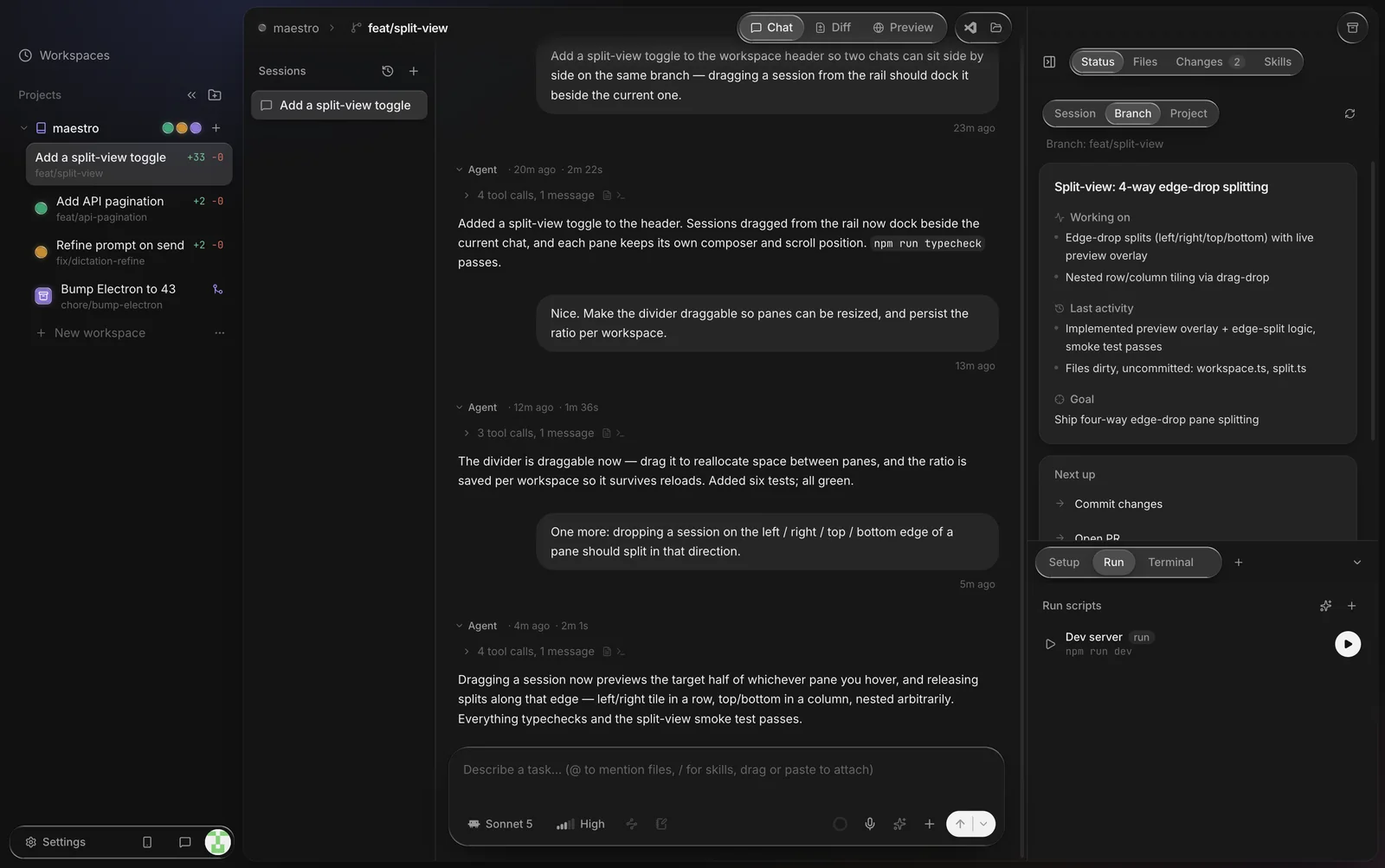
Grok Build lives in the terminal: an interactive TUI for working with it live, and a headless mode for scripts. One task at a time, that's all you need. Running several tasks at once in the same checkout is where it breaks down, because the runs edit the same files. Maestro gives each Grok Build task its own worktree and branch, keeps every session's chat in one window, and handles the review and PR steps around them.
What you get on top of the CLI
- Parallel workspaces. Each workspace is a separate git worktree on its own branch, so parallel Grok Build runs never write to the same checkout. There is no limit on the number of workspaces.
- A diff review loop. See what each Grok Build run changed, comment on specific lines, and send the comments back to Grok Build as the next message.
- Pull requests. Open a PR for the workspace branch without leaving the app.
- An editor and a preview. A Monaco-based editor with Jupyter notebook support, a terminal per workspace, and a built-in browser preview with freeze-frame annotations.
- Your phone. Maestro Web mirrors each workspace to a mobile web app, so you can follow a Grok Build turn, reply, and review the diff away from your desk. Grok Build keeps running on your own machine.

How it works
Maestro runs the official grok binary in headless mode, one process per message,
inside the workspace's worktree. Each turn is
grok -p <prompt> --output-format streaming-json, which xAI documents in its
headless and scripting guide.
Grok Build's -s flag creates or resumes a named session, so Maestro picks a session id
for each chat and passes the same -s <id> on every message. Each follow-up continues
the same Grok Build conversation.
- A readable transcript. Grok Build's streaming JSON becomes chat: its replies, reasoning, tool calls with their results, and errors.
- A model picker. Choose a Grok model per chat; Maestro passes it to the CLI with
-m. - Approvals. A headless run has no one at the terminal to answer an approval prompt, so Maestro passes
--always-approve, which auto-approves tool runs. Each workspace is its own worktree, so a run only touches its own branch. Maestro also passes--no-auto-updateso a background update check can't get in the way of the run. - No plan toggle. Grok Build's plan mode waits for an interactive approval, which a headless run can't give, so Maestro hides its plan toggle for Grok Build workspaces.
- Your account. Grok Build signs in the way it always does and keeps its own credentials under
~/.grok. Settings → Harnesses shows whether it is connected. You can also save an xAI API key in Settings; Maestro passes it to Grok Build asXAI_API_KEY. Maestro does not proxy or bill your usage. - Remote machines. On an SSH project,
grokruns on the remote host. If it isn't installed or signed in there, Maestro says so and offers the install command. On a server without a browser, xAI's docs recommend an API key (XAI_API_KEY). - Maestro's own AI features. Maestro writes things like status digests with whichever agent CLI you have installed. If Grok Build is the only one (no Claude Code or Codex), Maestro uses Grok Build for those, so they work without any extra API key.
Set it up
curl -fsSL https://x.ai/cli/install.sh | bash on macOS and Linux, or irm https://x.ai/cli/install.ps1 | iex in Windows PowerShell. Check it with grok --version.
grok in a project folder; on first launch it opens a browser to sign in. Without a browser, set XAI_API_KEY instead. If Grok Build is missing, Maestro's Settings → Harnesses can run the right installer for your OS and start the sign-in in an in-app terminal.
Running Grok Build on Windows and Linux
Grok Build ships installers for macOS, Linux, and Windows, and Maestro runs on all three, so the workflow is the same everywhere. On Windows, Maestro's one-click install uses xAI's PowerShell installer; on macOS, Linux, and SSH hosts it uses the shell script. Install notes for Maestro are on the Windows and Linux pages.
Is there an official Grok Build app?
As of October 2026, xAI's Grok Build docs describe a terminal UI, a headless mode for scripts, and the Agent Client Protocol (ACP) for connecting Grok Build to other tools. They don't list a first-party desktop app (xAI's docs). Community-built desktop wrappers exist; they aren't made by xAI.
Maestro makes sense when:
- you want a GUI over the Grok Build CLI itself, with the same install and sign-in you use in the terminal, and to keep using the terminal too;
- you want each parallel task isolated in its own git worktree and branch, with a PR at the end;
- you also use Claude Code, Codex, Cursor's agent CLI, OpenCode, or Kimi Code, and want them all in one window, one agent per workspace;
- you want every workspace on your phone through Maestro Web.
The worktree pattern Maestro uses is the same one you'd set up by hand. For the plain-git version, read how to run Claude Code in parallel with git worktrees; the git side is the same for any agent, Grok Build included.
FAQ
Is Maestro made by xAI?
No. Maestro is independent and not affiliated with or endorsed by xAI. It runs the official Grok Build CLI, which you install from xAI.
Can I run several Grok Build sessions at once?
Yes. Every workspace is its own Grok Build session in its own git worktree, and there is no cap on workspaces. They run side by side and never share a checkout.
Do I need an API key?
No, if the Grok Build CLI is signed in through the browser. An xAI API key works too, and is the easier route on a remote server. Maestro uses whichever the CLI has.
Which platforms does it run on?
macOS (Apple Silicon), Windows 10/11 (64-bit), and Linux (x86_64 AppImage). See Windows and Linux for install notes.
Is it free?
Yes, Maestro and Maestro Web are free. Grok Build usage counts against your own xAI account, as it does in the terminal.
Can I run Grok Build and Claude Code at the same time?
Yes. The agent is chosen per workspace, so Grok Build can work in one worktree while Claude Code, Codex, or Kimi Code work in others.